
LG UltraGear monitors auto-install McAfee and LG apps on Windows 11, silently
After first plug-in, Windows Update can install LG driver updates and LG Monitor App Installer without permission prompts.
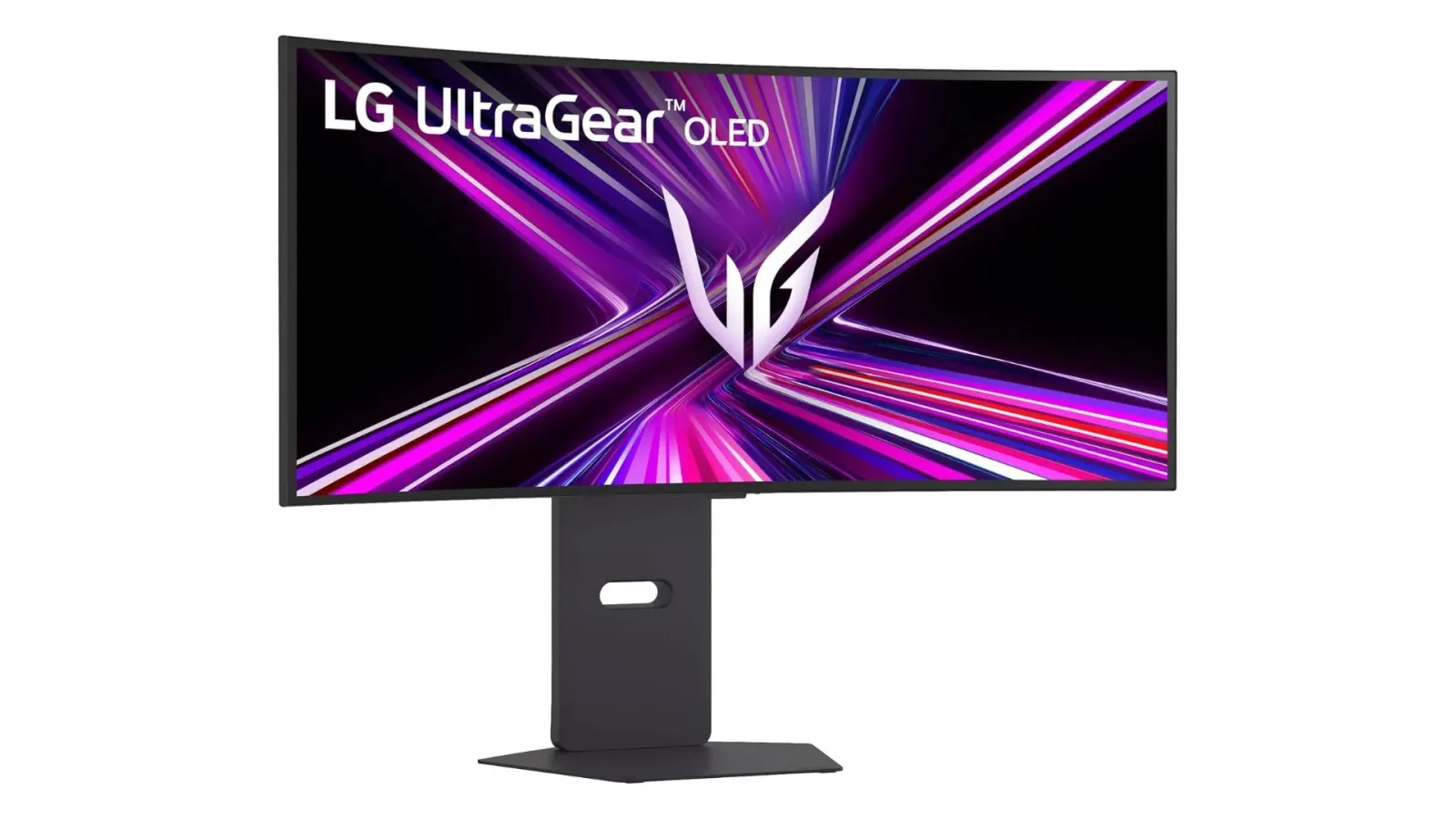
LG’s UltraGear monitor experience on Windows 11 can trigger silent installs of LG driver updates plus the LG Monitor App Installer, which then points users to other LG apps and McAfee antivirus. For decision-makers, it raises serious trust, support, and compliance-risk questions in a world that is already hypersensitive to “bundled” software.
The problem is not just that LG’s monitor software shows up. After connecting a new LG UltraGear monitor to a Windows 11 PC for the first time, Windows Update can silently install LG driver updates and the LG Monitor App Installer, without showing a permission pop-up or any notification.
That behavior is tied to specific monitor hardware, including the LG 34GX900A-B, according to testing referenced by The Verge. Once installed, the LG Monitor App Installer does not offer special controls of its own. Instead, it essentially acts like a redirect, pointing users to LG’s other apps and to McAfee antivirus.
This is the kind of distribution choice that can snowball quickly, because it collides with how PCs are supposed to feel: under user control. Gamers Nexus’s test, highlighted by The Verge, describes the “first plug-in” moment as the trigger, where Windows Update handles the background installation of LG components. The key detail is the absence of an explicit permission prompt. For most software categories on Windows, users expect a decision point when installing drivers or applications that can affect system behavior, add services, or change security posture.
The mechanics matter. Gamers Nexus frames it as Windows Update taking the silent route, which means the install is happening as part of Windows’ normal update process rather than through a more obviously user-driven installer flow. That reduces friction for benign updates like device support, but it also makes the user experience feel more like “surprise software” when the outcome includes an installer that points toward McAfee antivirus.
And this is not happening in a vacuum. The Verge reports that there are reports about LG’s app auto-installing as far back as 2024. Then, more recently, user complaints on Reddit described large pop-up ads for McAfee and LG’s own apps appearing suddenly in the bottom right corner of the screen. In other words, the initial “silent install” may be only the first act, while the visible pop-up ads are the part users experience and remember.
Why does this matter beyond one annoying pop-up? Because monitor and peripherals are increasingly software-defined. The “device” is no longer just hardware; it includes driver packages, companion apps, and sometimes monetizable security tools or affiliate relationships. LG’s installer pointing users to McAfee suggests the monitor software ecosystem is being used as a funnel. When that funnel opens without clear consent, the backlash is predictable: users do not differentiate between “device vendor integration” and “bundled software.” They just see uninvited prompts and ads.
There is also a broader regulatory and platform-trust angle worth executives keeping on their radar. Regulators and policymakers have been tightening expectations around transparency, consent, and dark patterns in software distribution, and Windows itself is a battleground for installer behavior. Even when an install occurs through legitimate update channels, the perception of consent still drives complaints, support costs, and brand damage. If users feel tricked, they reach for recourse: reviews, refunds, complaints, and security tool churn. That churn is expensive for OEMs and for partners like antivirus brands, because reputational trust is shared even when the target is a specific app.
Second-order implications land squarely on operating teams. Customer support inboxes do not care whether the install was triggered by Windows Update or a vendor installer. IT teams do not care whether the monitor companion app includes “special controls,” they care whether it changes endpoints, triggers alerts, or complicates compliance. For boards and leadership, the risk profile is not limited to LG. It is a warning about ecosystem incentives: once software is bundled with hardware acquisition, the entire customer journey becomes a distribution channel, and the consent and transparency bar has to keep up.
For peers across consumer electronics, the strategic question is simple. Are you building a companion experience, or are you building a pipeline? LG’s case, as described by Gamers Nexus testing and The Verge reporting, shows how fast a pipeline can turn into a trust problem, especially when the first-time connection results in silent installs and then later, in some reports, pop-up ads for McAfee and LG apps.
This story's Key Insights and Take-aways are locked.
Create a free account to unlock Executive Actions for one credit.
Register to UnlockAlways free for Executives Club members. Join the Club
More in Technology
Google quietly links your phone number to every Android account on your SIM
Adding a SIM now ties your phone number to all Google accounts - and future accounts inherit it. Here's the security and privacy stakes.

Hijacker AI 'Skynet mode' runs 100,000 attack steps against exposed models
Symantec caught a criminal AI agent that borrows other models, steals data, and mines crypto; the only relief is no confirmed victims yet.
Nvidia's AI-financier shift faces its first big test as neoclouds stumble
A rout in neocloud stocks is forcing investors to weigh Nvidia's hidden exposure as both supplier and lender to the AI buildout.